Skip to content
  • Sandbox persistence is now GA

    Vercel Sandboxes now automatically save and restore filesystem state between sessions. Persistence is on by default, meaning no snapshots to manage or state to track manually.

    Each sandbox has a durable, customizable name that acts as a unique reference in your project. You can create, retrieve, or resume a sandbox by name. Vercel spins sessions up and down automatically, without interrupting your workflow.

    Link to headingCreate a persistent sandbox

    When you call Sandbox.create(), persistence is enabled by default:

    import { Sandbox } from "@vercel/sandbox";
    // Filesystem is snapshotted automatically
    const sandbox = await Sandbox.create({ name: "my-sandbox" });
    await sandbox.runCommand("npm", ["install"]);
    await sandbox.stop();

    Create a sandbox with persistence on by default


    Each automatic snapshot consumes snapshot storage, which is billed separately from compute. For ephemeral workloads, opt out of persistence to minimize storage costs:

    import { Sandbox } from "@vercel/sandbox";
    const sandbox = await Sandbox.create({ persistent: false });
    // Or update an existing sandbox.
    await sandbox.update({ persistent: false });

    Create an ephemeral sandbox

    To opt out of persistence with the CLI, pass --non-persistent to sandbox create. Non-persistent sandboxes discard their filesystem when the session ends.

    Link to headingResume a persistent sandbox

    Resuming is automatic. Any call on a stopped sandbox, like runCommand() or writeFiles(), starts a new session from the most recent snapshot.

    import { Sandbox } from "@vercel/sandbox";
    const resumedSandbox = await Sandbox.get({ name: "my-sandbox" });
    // Automatically resumes the sandbox.
    await resumedSandbox.runCommand("npm", ["test"]);

    Automatically resume a stopped sandbox

    Link to headingOther improvements

    • Sandbox.fork(): Create a new sandbox from an existing one

    • Sandbox.getOrCreate(): Idempotent retrieve-or-create for long-lived sandboxes

    • Sandbox.delete(): Permanently delete a sandbox

    • Richer sandbox.stop(): Returns snapshot metadata plus active-CPU and network-transfer totals

    • Lifecycle hooks: onCreate and onResume hooks for create, get, and getOrCreate

    • Tags: Assign custom properties to sandboxes for multi-tenant tracking

    Link to headingGet started

    Upgrade to the latest version to create persistent sandboxes by default:

    • pnpm install @vercel/sandbox@latest # SDK

    • pnpm install -g sandbox@latest # CLI

    Learn more about persistent sandboxes in the documentation.

  • Firecrawl joins the Vercel Marketplace

    Firecrawl is now available on the Vercel Marketplace, allowing Vercel teams to power AI agents and applications with structured web data without managing crawling infrastructure.

    This integration helps developers scrape websites into LLM-ready formats, search and retrieve full page content, and interact with dynamic pages for retrieval and agent workflows.

    Key capabilities include:

    • Scrape pages into markdown, HTML, structured data, or screenshots

    • Search the web and retrieve full page content in a single call

    • Interact with dynamic websites using AI prompts or code

    Get started with Firecrawl on the Vercel Marketplace.

    Michael Toth, Hedi Zandi

  • Microfrontends routing now applies to vc alias and branch domains

    This week we are gradually rolling out an update to Vercel Microfrontends routing for aliases and branch-assigned domains.

    Aliases inherit Microfrontends routing
    Aliasing a Microfrontends URL with vc alias now preserves the full microfrontends routing config from the source deployment. Previously, the new alias only inherited the deploymentId. Update to the latest Vercel CLI to pick up the change.

    Branch domains route across all projects
    A project domain assigned to a git branch now routes to that branch in every project in the Microfrontend that shares the branch name. Previously, the domain only routed to that branch within the project that owned the domain.

    See the Microfrontends documentation for details on routing, aliases, and domain assignment.

    Kit Foster, Tim White

  • Pull anomaly alert details using the Vercel CLI

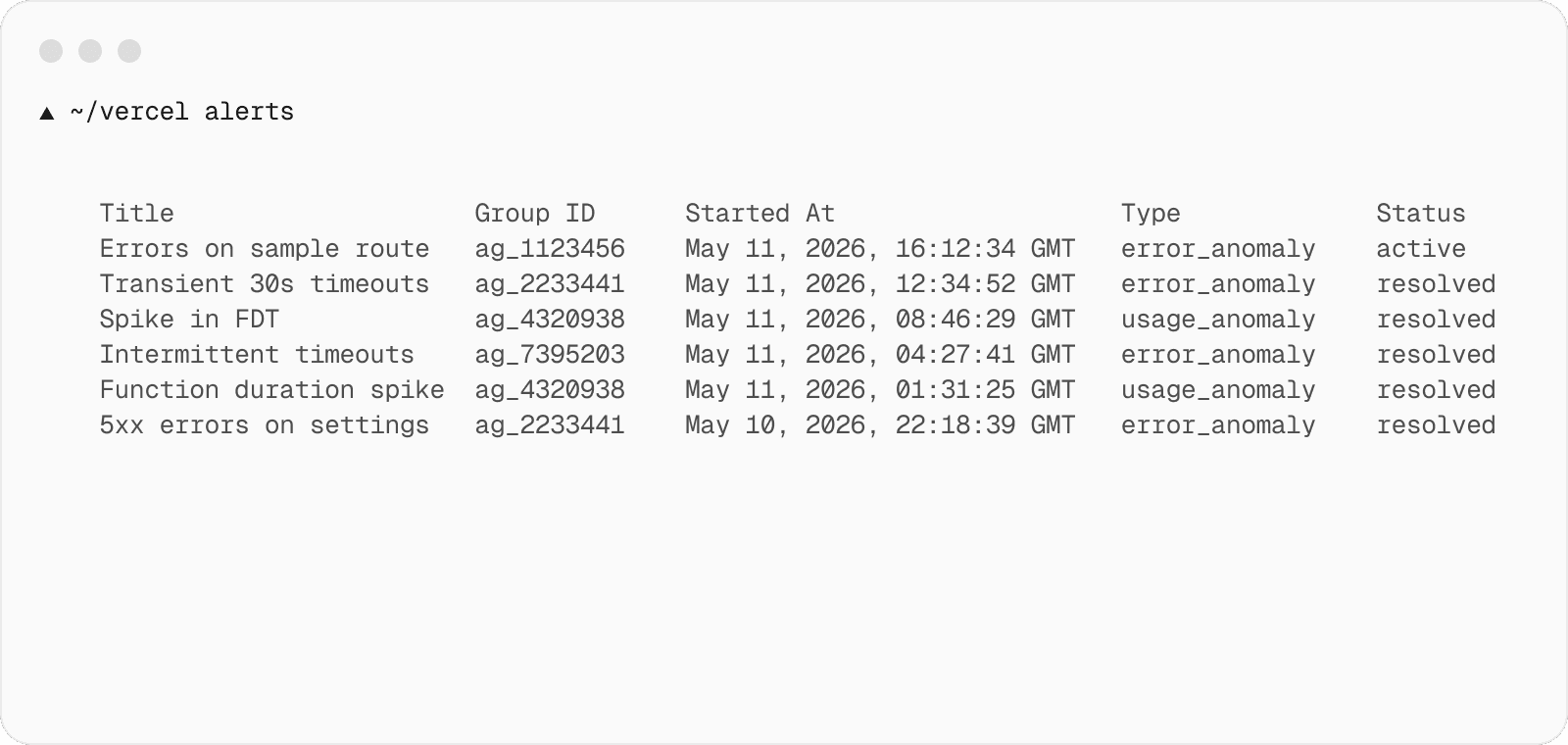
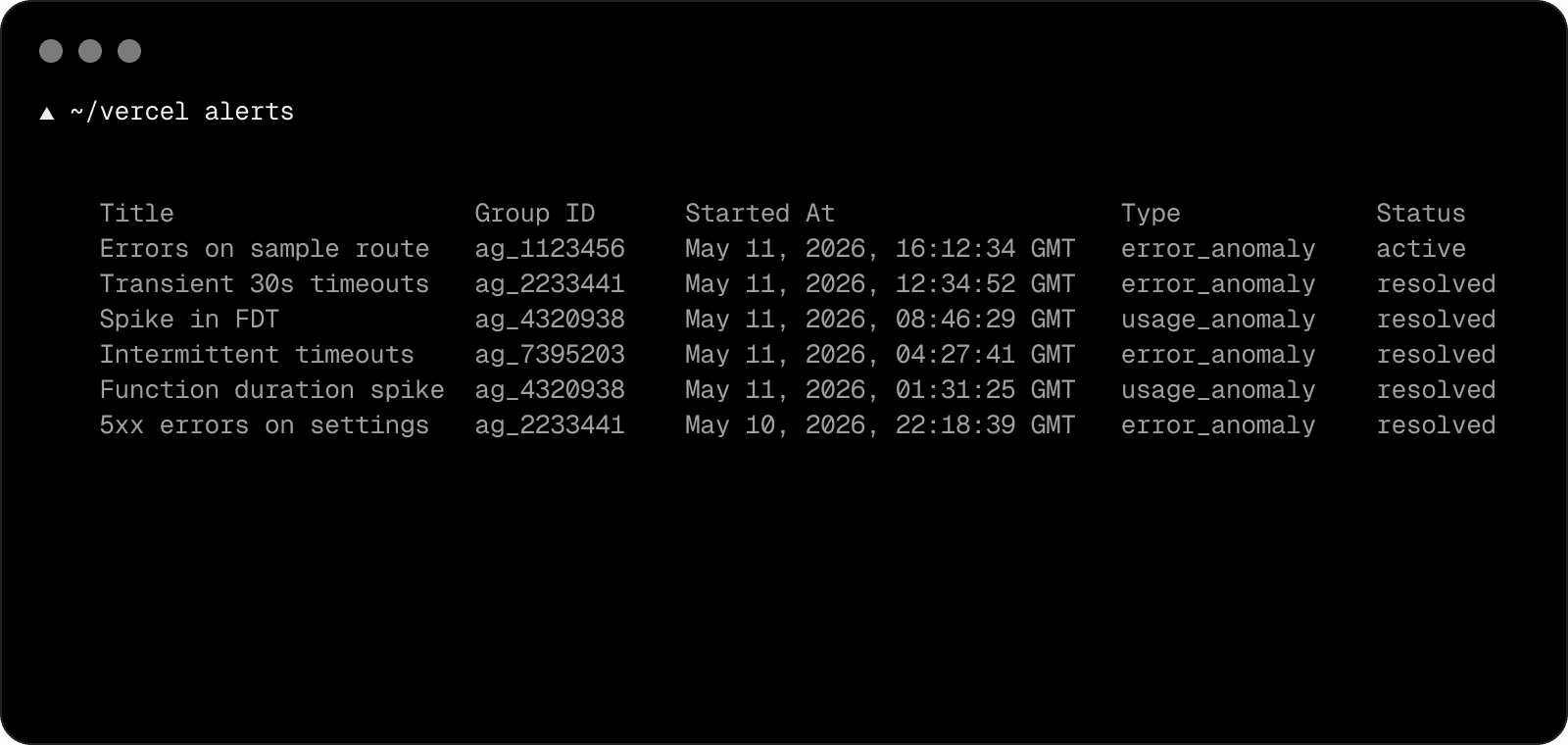
    You can now access anomaly alerts and their details directly through the Vercel CLI.

    With the vercel alerts command, you can list all alerts for a team or given project. For each alert, you can view the start time, the type of alert, and whether or not the alert is still active.

    With the --ai option, the AI investigation results appear alongside each alert. You and your agent can act on alerts without leaving the terminal.

    vercel alerts --ai

    Shows alert details with AI investigation results inline.

    Available on Observability Plus.

    Learn more about vercel alerts in the CLI documentation.

    Julia Shi

  • Qwen 3.7 Max now available on Vercel AI Gateway

    Qwen 3.7 Max from Alibaba is now available on Vercel AI Gateway. The model is designed as an agent foundation, with capabilities spanning coding, office workflow automation, and long-horizon autonomous execution.

    Qwen 3.7 Max shows improvements in frontend prototyping and complex multi-file engineering. The model supports office and productivity tasks through multi-agent orchestration and sustains coherent reasoning across long-horizon tool-calling sessions.

    To use Qwen 3.7 Max, set model to alibaba/qwen-3.7-max in the AI SDK.

    import { streamText } from 'ai';
    const result = streamText({
    model: 'alibaba/qwen3.7-max',
    prompt: `Refactor this service into smaller modules and update callers across the repo.`,
    });

    AI Gateway provides a unified API for calling models, tracking usage and cost, and configuring retries, failover, and performance optimizations for higher-than-provider uptime. It includes built-in custom reporting, observability, Bring Your Own Key support, and intelligent provider routing with automatic retries.

    Learn more about AI Gateway, view the AI Gateway model leaderboard or try it in our model playground.

  • Configure weighted traffic splits for Vercel Flags from the Vercel CLI

    You can now configure weighted traffic splits for Vercel Flags with the new vercel flags split command in the Vercel CLI. This allows you to send a percentage of traffic to one variant and the rest to another.

    Run the command interactively, or pass the environment, bucketing attribute, and variant weights as flags:

    vercel flags split redesigned-checkout \
    --environment production \
    --by user.id \
    --weight off=95 \
    --weight on=5

    Sets a 95/5 weight split on redesigned-checkout for production, bucketing by user.id

    Update to the latest version of the Vercel CLI and read the documentation to get started.

  • Grok Build 0.1 now available on Vercel AI Gateway

    Grok Build 0.1 is now available on Vercel AI Gateway.

    This is a beta coding model trained for agentic coding, currently in early access, and powers the Grok Build CLI app. Reasoning effort is not configurable, and there is no non-reasoning mode.

    To use Grok Build 0.1, set model to xai/grok-build-0.1 in the AI SDK.

    import { streamText } from 'ai';
    const result = streamText({
    model: 'xai/grok-build-0.1',
    prompt: 'Refactor this module to use async/await and add tests.',
    });

    AI Gateway provides a unified API for calling models, tracking usage and cost, and configuring retries, failover, and performance optimizations for higher-than-provider uptime. It includes built-in custom reporting, observability, Bring Your Own Key support, and intelligent provider routing with automatic retries.

    Learn more about AI Gateway, view the AI Gateway model leaderboard or try it in our model playground.